How to use FireRed/LeafGreen
How to compile
make firered -j<output of nproc>
or
make leafgreen -j<output of nproc>
Note: If you switch between building emerald and FRLG, make clean is required at the moment.
Porymap adjustments
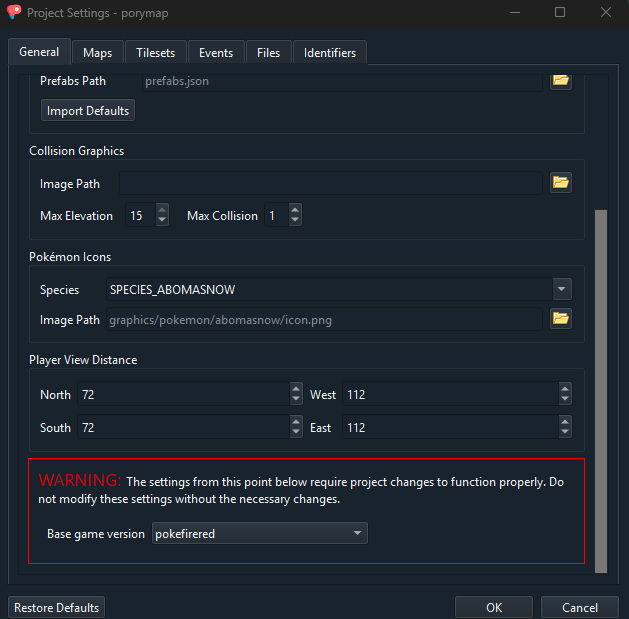
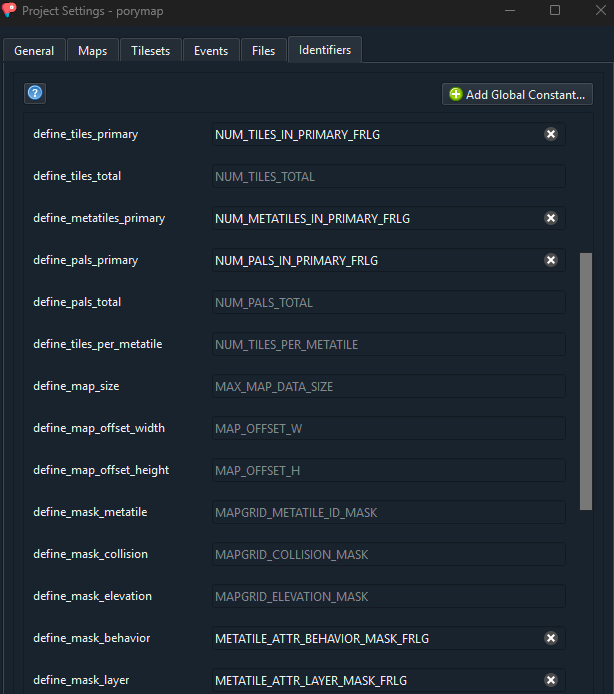
For Porymap to work with FRLG maps you need to adjust a few settings (Options > Project Settings):
- in the
Generaltab change the base game version topokefirered
- in the
Identifierstab change the following attributes:- define_tiles_primary:
NUM_TILES_IN_PRIMARY_FRLG - define_metatiles_primary:
NUM_METATILES_IN_PRIMARY_FRLG - define_pals_primary:
NUM_PALS_IN_PRIMARY_FRLG - define_mask_behavior:
METATILE_ATTR_BEHAVIOR_MASK_FRLG - define_mask_layer:
METATILE_ATTR_LAYER_MASK_FRLG
- define_tiles_primary:
How to add maps
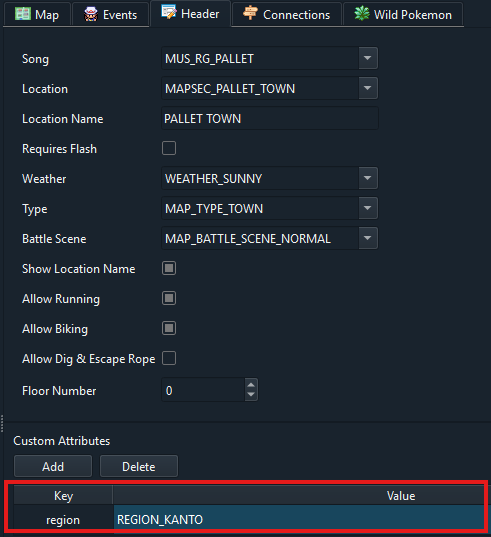
For maps to be included in the build process they need to have a custom attribute region with the value REGION_KANTO or REGION_HOENN for their respective games.
If you create a new map, the region will not be there, and must be added manually in the map.json or through Porymap.
Examples:
map.json:
{
  "id": "MAP_PALLET_TOWN",
  "name": "PalletTown_Frlg",
  "layout": "LAYOUT_PALLET_TOWN",
  "music": "MUS_RG_PALLET",
  "region": "REGION_KANTO",
  ...
Porymap:
If a map does not have the region attribute, the compiler will default to what game you compile, and the map you created gets included in that game.
Additionally, maps must have a layout_version that you manually include in layouts.json.
    {
      "id": "LAYOUT_ONE_ISLAND_KINDLE_ROAD_EMBER_SPA",
      "name": "OneIsland_KindleRoad_EmberSpa_Layout",
      "width": 27,
      "height": 39,
      "primary_tileset": "gTileset_General_Frlg",
      "secondary_tileset": "gTileset_MtEmber",
      "border_filepath": "data/layouts/OneIsland_KindleRoad_EmberSpa_Frlg/border.bin",
      "blockdata_filepath": "data/layouts/OneIsland_KindleRoad_EmberSpa_Frlg/map.bin",
      "border_height": 2,
      "border_width": 2,
      "layout_version": "frlg"
    },
Similarly to the region attribute, if a map in layouts.json does not have a layout_version, it will default to the game being compiled.
Lastly, you cannot properly access map inside a vanilla map group from a different game. If you create a new map in a Fire Red map group (such as gMapGroup_TownsAndRoutes_Frlg), you cannot warp or connect to it from an Emerald map in game, and vice versa. It is recommended to either put them in existing, fitting map groups, or create a new map group.
Migrating FRLG tilesets
To migrate tilesets that have been previously created for pokefirered you can use this script.
Instructions are in the script.
Disclaimer: The changes below aren’t the permanent solution for the problems, A better build system is being worked on so these solutions might cause merge conflicts down the line
Build FRLG by default
If you want that running make -j<output of nproc> to directly compile one of firered or leafgreen instead of emerald make the following changes to the makefile
(Here I have set the default version to be leafgreen and you can still compile emerald or firered using make emerald or make firered)
-GAME_VERSION ?= EMERALD
-TITLE        ?= POKEMON EMER
-GAME_CODE    ?= BPEE
-BUILD_NAME   ?= emerald
-MAP_VERSION  ?= emerald
+GAME_VERSION ?= LEAFGREEN
+TITLE        ?= POKEMON LEAF
+GAME_CODE    ?= BPGE
+BUILD_NAME   ?= leafgreen
+MAP_VERSION  ?= firered

ifeq (firered,$(MAKECMDGOALS))
  	GAME_VERSION 	:= FIRERED
	TITLE       	:= POKEMON FIRE
	GAME_CODE   	:= BPRE
	BUILD_NAME  	:= firered
	MAP_VERSION 	:= firered
else

-ifeq (leafgreen,$(MAKECMDGOALS))
-	GAME_VERSION 	:= LEAFGREEN
-	TITLE       	:= POKEMON LEAF
-	GAME_CODE   	:= BPGE
-	BUILD_NAME  	:= leafgreen
-	MAP_VERSION 	:= firered
+ifeq (emerald,$(MAKECMDGOALS))
+	GAME_VERSION 	:= EMERALD
+	TITLE       	:= POKEMON EMER
+	GAME_CODE   	:= BPEE
+	BUILD_NAME  	:= emerald
+	MAP_VERSION 	:= emerald
endif
endif
Make empty region attibutes defaults to REGION_KANTO
Another issue is that you need to add REGION_KANTO attribute to every new map you create
Make the following changes to your tools/mapjson/mapjson.cpp so the new maps you add without the REGION_KANTO also work fine
string region = json_to_string(map_data, "region", true);

        if (region.empty()) {
-            region = "REGION_HOENN";
+            region = "REGION_KANTO";
        }
        string map_name = json_to_string(map_data, "name");

        if ((version == "emerald" && region != "REGION_HOENN")
         || (version == "firered" && region != "REGION_KANTO")) {
            invalid_maps.push_back(map_name);
        }
Then run this script to set REGION_KANTO as the region attribute for all the Hoenn Maps
Make sure you run this from the root folder of your project!
python3 migration_scripts/add_region_hoenn_attribute_to_hoenn_maps.py
Make sure to run make clean after running this script
Fix CI if you are building FRLG by default
If you make these I would also reccomend fixing your CI too to match these changes
Make the following changes to your .github/workflows/build.yml
# build-essential and git are already installed

-      - name: ROM (Emerald)
+      - name: ROM (Leafgreen)
        env:
          COMPARE: 0
-          GAME_VERSION: EMERALD
+          GAME_VERSION: LEAFGREEN
        run: make -j${nproc} -O all

      - name: Release
        env:
-          GAME_VERSION: EMERALD
+          GAME_VERSION: LEAFGREEN
        run: |
          make tidy
          make -j${nproc} release
        # make tidy to purge previous build

      - name: Test
        env:
-          GAME_VERSION: EMERALD
+          GAME_VERSION: LEAFGREEN
          TEST: 1
        run: |
          make -j${nproc} check

      - name: ROM (Firered)
        env:
          COMPARE: 0
        run: |
          make clean
          make firered -j${nproc} -O

-      - name: ROM (Leafgreen)
+      - name: ROM (Emerald)
        env:
          COMPARE: 0
        run: |
-          make leafgreen -j${nproc} -O
+          make emerald -j${nproc} -O